DESIGN.md
# TTY — Design System

## Concept

**An image API rendered as a terminal session.** Warm cream paper, near-black ink,
one monospaced face carrying every word on the page from the hero headline down to the
footer fine print, ASCII `[+]` / `[-]` bracket markers where other systems put icons —
and a single dark object doing the one moment of color work: not a photograph and not a
gradient, but **a terminal**, a `$` prompt where the request URL is typed and the
response prints back beneath it.

TTY starts from a page that has decided its whole identity is one typographic
decision. **opencode**, a developer-tools brand, sets its entire marketing site in a
single monospaced face — every heading, every paragraph, every button, every legal
line — so the page reads like a `man` page or a static-site README rather than a
styled marketing layout. Its bullets are bracketed ASCII markers, its wordmark is
block-pixel character art, and its only "visual moment" is one dark card that mocks up
the product's own terminal UI. There is no sans-serif anywhere, no display face, no
italic, no gradient, no shadow, no photograph. The justification is exact: opencode's
product **is** a terminal, so a marketing page that is also a terminal is not a costume
— it is the product shown at 1:1.

Point that language at a URL-driven image API and the justification gets *stronger*,
not weaker, and reckoning with why is the whole design. Refract has no dashboard, no
console, no visual surface of its own to screenshot. **Its entire interface is a line
of text you type** — `https://demo.refract.dev/hero.jpg?w=1200&fm=auto&q=80` — and a
response that prints back. You do not *look at* Refract; you *type* it. A page made
entirely of monospaced text is therefore not a stylistic borrow here; it is the only
honest rendering of a product whose user interface is a string. Where a photography-led
page would invent chrome the API does not have, TTY shows exactly what the API is: a
command and its output.

One thing changes from the reference, and changing it is the design. opencode has a
single product to mock up — its TUI — so **one** dark terminal card per page suffices,
and the reference is strict that the dark surface stays scarce. Refract is *nothing
but* terminal sessions: the request is a session, the SDK call is a session, the docs
are a session, the rate-limit response is a session. So the dark terminal **recurs**
across the site — but under a hard rule that keeps it from becoming decoration: **every
dark surface in this system is a literal command session showing real request and real
response, never a styled dark band behind body content.** The chrome around every
terminal stays flat cream. opencode reserved its dark card because it had one thing to
show; TTY repeats it because the product it is selling has nothing else to show. That
is the adaptation, stated plainly, and it is checkable: if a dark block on this page is
not a running command, it is a defect.

opencode's proprietary face is **Berkeley Mono**; the substitute its own analysis names
is **JetBrains Mono**, and that is the single face used here, self-hosted, at weights
400 / 500 / 700. The lineage is named in this document and **nowhere else** — the built
page carries only the product's own name, **Refract**, in English, rendered as its own
block-pixel wordmark.

The other designs under this brief take the same ten parameters somewhere TTY will not
follow, and the lines matter most where a viewer might confuse two.

- **`prism`** (the near-white edge-platform) is the sibling TTY is closest to and the
  one it must separate from hardest. Both are light, both set technical marks in
  JetBrains Mono. But prism is a **geometric-sans** system — Inter carries display,
  body, buttons, prices — and reserves mono for *marks only* (eyebrows, parameter
  names). Its decoration is a hero-scale **spectrum gradient**; its CTA is a **100px
  ink pill**; its depth is a **stacked soft shadow**; it inverts to a dark band exactly
  once. TTY has **no sans anywhere** — mono carries *everything*, prose included — **no
  gradient at all**, **no pill** (interactive elements are 4px rectangles), **no
  shadow of any kind**, and it drops a dark terminal wherever a command runs rather
  than once per page. Where prism says "developer platform" with a calm sans and a
  band of light, TTY says it with a man page and a blinking cursor.
- **`spec`** (the automotive configurator) shares TTY's 0px corners on containers and
  its restraint, but it is a **sans** system running one flat automotive blue as its
  action color with a heavy-700-against-thin-300 contrast. TTY's blue never touches the
  cream chrome — it exists only as syntax *inside* a terminal — and its 0px corners are
  containers only; interactive elements are 4px, not square.
- **`carton`** (the printed-carton voice) is the nearest in *spirit* — both are pages
  built out of monospaced text that talk to the developer directly — and the nearest to
  mistake for TTY, so the line is drawn hard. carton's monospace is a **typewriter**
  used to be folksy, apologetic, digressive; its borders are hand-drawn; it will not
  stop talking. TTY's monospace is the **machine's own voice** — terse, precise,
  man-page clipped — its rules are hairlines, its ornament is nothing. carton is warm
  because it is chatty; TTY is warm only in its paper (`#fdfcfc`), and otherwise
  engineered and quiet.
- **`folio`** (the print magazine) is also square-cornered and text-first, but it is a
  **serif** editorial with an exposed column grid and a drop cap. TTY is a monospace
  teletype with no columns, no serif, no drop cap — content runs left-flush down a
  single measure.
- **`reel`**, **`cutaway`**, **`node`**, **`aperture`** share only the alphabet: `reel`
  is full-bleed cinematic photography on black, `cutaway` is a graphite hardware bench,
  `node` is a pressable candy toy, `aperture` is a photo marketplace. TTY has almost no
  photography, a cream canvas, no elevation, and no play.

Where the reference has no answer, the answer is the browser — and the browser, here,
is *also* a terminal. The brief promises a live before/after transform, and TTY runs
one inside a working command line: a control row rewrites the request as you adjust it,
and the image **redraws inline in the terminal** the way a modern image-capable
terminal (kitty, iTerm2's inline-image protocol) renders a picture beneath the command
that produced it. That demo stops exactly where an honest browser stops. `fm`, `q`, and
`dpr` are format negotiation, server-side re-encoding, and pixel-ratio selection, which
a browser cannot perform and this design will not fake — they ride the request string,
tagged `negotiated`, named without being pretended. **No invented byte count is ever
printed beside a live transform**; the documented 62% average lives only in the labeled
stats readout, where it is a stated fact and not a per-file measurement.

## Palette

Ink on warm cream, a four-tier gray ladder doing all the structural work, and — the one
departure — a **terminal syntax palette that exists only inside the dark command
blocks**. Nothing on the cream chrome carries color at all. Not a link, not a button,
not a badge, not a state. The page is monochrome; the terminal glows.

| Token                   | Hex                    | Role                                                                            |
| ----------------------- | ---------------------- | ------------------------------------------------------------------------------- |
| `--canvas`              | `#FDFCFC`              | The warm cream paper — the only body background, every section, every card.     |
| `--surface-soft`        | `#F8F7F7`              | Input default fill, the one alternating row tint.                               |
| `--surface-card`        | `#F1EEEE`              | The light install-snippet fill; disabled fill.                                  |
| `--ink`                 | `#201D1D`              | Near-black. Every heading, body-strong mark, primary CTA fill, wordmark.        |
| `--ink-deep`            | `#0F0000`              | Pressed state for the primary CTA — a faint warm-red undertone matching cream.  |
| `--charcoal`            | `#302C2C`              | Softer heading where pure ink is too heavy.                                     |
| `--body`                | `#424245`             | Default running copy, list-row descriptions, table cells.                       |
| `--mute`                | `#646262`             | Metadata, tab labels at rest, footer links — label-only (see rules).            |
| `--stone`               | `#6E6E73`              | Least-emphasis utility text, breadcrumb separators.                             |
| `--ash`                 | `#9A9898`             | Disabled text; secondary text inside the dark terminal — never body on cream.   |
| `--hairline`            | `rgba(15,0,0,0.12)`    | The 1px rule: section dividers, table rows, list separations, input outlines.   |
| `--hairline-strong`     | `#646262`             | The stronger divider: tab-strip underline, secondary-button ring.               |
| `--tui-bg`              | `#201D1D`              | The terminal surface — identical to `--ink`; one near-black for type and dark.  |
| `--tui-bg-elevated`     | `#302C2C`              | The inset prompt row inside a terminal, one notch lighter than the surface.     |
| `--on-dark`             | `#FDFCFC`              | Default text on the terminal — cream on near-black.                             |
| `--on-dark-mute`        | `#9A9898`             | Terminal comments, hints, keybinding row, secondary output.                     |
| `--tui-ok`              | `#30D158`              | **Terminal only.** The phosphor voltage: the `$` prompt, caret, `200`, success. |
| `--tui-key`             | `#5AC8FA`              | **Terminal only.** Parameter keys and flags in the request (`w=`, `--fit`).     |
| `--tui-warn`            | `#FFB340`              | **Terminal only.** A `note:` line, the `negotiated` tag, a `429` status.        |

Rules:

- **Color exists only inside a terminal, and there are exactly three of it.** `--tui-ok`
  (green), `--tui-key` (blue), and `--tui-warn` (amber) appear only on the `--tui-bg`
  dark surface, as syntax highlighting on real command sessions. This is inherited to
  the letter from the reference, whose full semantic ramp "appears primarily inside the
  hero TUI mockup as syntax-highlight stand-ins" while "the marketing pages stay in
  monochrome." A green button on cream is a defect; the only green permitted is a `$`
  prompt or a `200` inside a terminal. There is no red on this site at all — a `429`
  rate-limit example is set in `--tui-warn` amber, not danger red, because the brief
  describes a limit, not an error the visitor hit.
- **The cream chrome is monochrome, and even the links are ink.** Every link in body
  prose is `--ink` with an underline — never blue. The reference reserves its blue for
  the in-product TUI and routes body links through ink, and TTY holds that exactly:
  blue is a *syntax token inside a terminal*, and a blue link anywhere on the cream page
  is a defect. Nothing converts on color; the primary CTA is **`--ink` fill**, because
  the reference's one conversion mark is a near-black rectangle.
- **Contrast (measured, WCAG 2.1, sRGB relative-luminance formula).** On `--canvas`
  (`#FDFCFC`): `--ink` **15.9:1**, `--charcoal` **13.0:1**, `--body` **9.4:1**, `--mute`
  **5.7:1**, `--stone` **4.9:1**. On the `--tui-bg` terminal (`#201D1D`): `--on-dark`
  **16.0:1**, `--on-dark-mute` / `--ash` **5.6:1**, `--tui-ok` green **8.3:1**,
  `--tui-key` blue **8.7:1**, `--tui-warn` amber **9.3:1**. Everything a visitor must
  read clears AA body (4.5:1) with margin, on cream and on the terminal alike.
- **`--ash` (`#9A9898`) does NOT hold AA on cream and is dark-surface-or-disabled only.**
  It measures **2.5:1** on `#FDFCFC` — below the body and large-text bars both. It is
  used only for disabled labels on light and for secondary/comment text *inside the
  terminal*, where its contrast on `--tui-bg` is a passing **5.6:1**. It never sets a
  paragraph, a parameter description, a price, or a stat on cream — those are `--body`
  (9.4:1) or `--ink`.
- **`--mute` (`#646262`) holds AA (5.7:1) but stays a label.** Metadata, tab labels at
  rest, footer links, the mono eyebrow above a section. When a mono token is
  load-bearing — a parameter name in the OPTIONS table — it is `--ink`, not `--mute`.
- **The hairlines carry no meaning.** `--hairline` measures far below the 3:1 non-text
  bar; `--hairline-strong` sits at ~5.7:1 but is used as a divider, not a control edge.
  No control's identity or state rests on a hairline alone: a terminal is a terminal
  because of its dark fill, an active tab is marked by a **2px `--ink` underline**, and
  focus is a **2px `--ink` outline** — never a hairline.
- **There is no elevation color and no shadow.** The reference ships zero drop shadows;
  the only thing that reads as "above" the page is the dark terminal surface. TTY
  inherits this whole: no card lifts, nothing floats, no shadow ever appears. Depth is
  the terminal, and nothing else.

## Typography

**One face, every role.** JetBrains Mono — the open-source substitute the reference's
own analysis names for Berkeley Mono — carries the display headline, the body
paragraph, the button label, the parameter table, the price, the terminal output, and
the footer legal line. There is no second family anywhere: no sans body, no serif
display, no italic alternative. **The single-font decision is the entire identity**, and
breaking it — reaching for a "cleaner" sans on a paragraph, an italic for emphasis — is
the fastest way to turn TTY into an ordinary developer page. It is self-hosted as woff2
under `assets/fonts/` via `@font-face`; no font CDN, no Google Fonts `<link>`.

The face carries weights **400 (regular), 500 (medium), 700 (bold)** and falls back
through the documented monospace stack — IBM Plex Mono → ui-monospace → SFMono-Regular →
Menlo → Monaco → Consolas → Liberation Mono → Courier New.

| Role        | Weight | Size / Leading | Tracking | Features | Use                                                       |
| ----------- | ------ | -------------- | -------- | -------- | --------------------------------------------------------- |
| Display XL  | 700    | 38px / 1.25    | 0        | —        | The index hero headline — the largest type in the system  |
| Display L   | 700    | 24px / 1.35    | 0        | —        | Docs / pricing page openers — the top line of an inner page |
| Heading     | 700    | 16px / 1.5     | 0        | —        | Section labels, uppercase man-page heads (`NAME`/`OPTIONS`), card titles, tier names, FAQ questions |
| Body        | 400    | 16px / 1.5     | 0        | —        | Default running copy, list-row text, install-snippet code |
| Body Strong | 500    | 16px / 1.5     | 0        | —        | Inline emphasis, active nav link, table parameter names   |
| Button      | 500    | 16px / 2.0     | 0        | —        | Every button label across the system                      |
| Caption     | 400    | 14px / 2.0     | 0        | —        | Footer links, badge labels, `Fig N.` captions, legal row  |
| Terminal    | 400    | 15px / 1.6     | 0        | **zero** | Every line inside a `--tui-bg` command block              |

Principles:

- **Hierarchy is size and weight on one face — nothing else.** The Display XL hero
  (38px / 700) and a section Heading (16px / 700) share their weight; only size
  separates them. Body and Body Strong share size and leading; only weight separates
  them. This is the most restrained typographic system in the brief, and the restraint
  is the point.
- **Zero letter-spacing, everywhere.** Monospace does not take the aggressive negative
  tracking that a geometric sans wants — `prism` tracks its 38px display to −2.4px, and
  reaching for that here would fight the grid the face is built on. Every role sits at
  `letter-spacing: 0`. This is a hard line against the near-white siblings: their
  display voice is tight negative tracking; TTY's is the fixed monospace advance.
- **Man-page section heads are UPPERCASE; prose is sentence case.** The docs page and
  the structural labels borrow the `man` convention — `NAME`, `SYNOPSIS`, `OPTIONS`,
  `LIMITS`, `EXAMPLES` in uppercase Heading weight. Marketing headlines and body copy
  stay sentence case and terse, the way a README reads. Headlines are declarative and
  short and may read as a plain statement or as a literal command; they are **not**
  forced to period-terminate (that is `prism`'s inherited Vercel tic, not this system's).
- **The slashed zero is functional, and it is the only OpenType feature declared.**
  `font-feature-settings: "zero"` is set **once on the root** and inherited by every
  role — the page is one face, so the slashed zero applies to the hero headline and the
  footer line alike (the table flags it on Terminal, the densest URL surface, but it is
  global). JetBrains Mono genuinely ships `zero`. In a system whose entire subject is a
  URL a developer will copy and retype, `?w=1200&q=80` must be unambiguous — a `0` that
  cannot be misread as an `O` is a requirement. **`tnum` is deliberately never
  declared:** JetBrains Mono is already one
  advance per glyph, so every figure aligns natively; declaring tabular figures on a
  monospace is a dishonest no-op. Columns of numbers — the stats readout, the pricing
  quotas — align because the face is monospaced, not because a feature was switched on.
- **Mono is not a "technical layer" here — it is the whole voice.** In `prism`, mono
  means "this is the machine talking" and sits inside a sans page. In TTY there is no
  sans to contrast against; the machine is talking the entire time. A parameter, a
  price, a paragraph, and a page title are all the same face, because the premise is
  that the whole site is one terminal session and a terminal has one font.

## Spacing & layout

The reference reads like a printed code listing: generous air between blocks, content
left-flush against a single measure, ASCII brackets standing in for indentation. TTY
keeps every part of that.

- **8px base unit**, with 1 / 2 / 4px fine steps for tight inline gaps. Tokens:
  1 · 4 · 8 · 12 · 16 · 24 · 32 · 96.
- **Section rhythm: 96px** between every major block, top and bottom — the reference's
  dominant layout cue. Only a 1px `--hairline` rule separates sections; there are **no
  decorative dividers** and, critically, **no surface alternation** — the reference
  forbids gray section bands, and TTY holds that: every section sits on the same
  `--canvas` cream, and the *only* non-cream surface anywhere is a dark terminal. A page
  that alternates tonal bands to create rhythm is doing what `prism` does; TTY creates
  rhythm with whitespace and hairlines alone.
- **Single measure, left-flush.** Content centers in a **~960px** column; the terminal
  blocks may run to a **~1100px** outer frame. Rows inside a section sit at 16px
  vertical with **no horizontal indentation** — text starts flush at the column's left
  edge, and list items lead with an ASCII `[+]` / `[-]` marker instead of an indent.
- **Radius: two values.** `0px` on every container — sections, terminals, nav, footer,
  list rows, the OPTIONS table, the pricing columns. `4px` on every interactive element
  — buttons, inputs, the light install-snippet, badges, the inset prompt row inside a
  terminal, the playground controls. There is **no full-round pill and no photograph**,
  so the reference's third radius (9999px, used there only for avatars) has no use in
  this system and never appears. A 100px pill is `prism`'s conversion mark and reaching
  for one is the fastest way to converge the two.
- **Elevation: none.** No card border-plus-shadow, no lift on hover, no floating
  popover. The one and only surface that reads as elevated is the `--tui-bg` terminal,
  and it earns that by color, not by shadow. This is inherited whole from the reference:
  "nothing lifts, nothing floats."
- **Card padding.** List rows sit at 8px vertical; FAQ rows at 12px; the terminal blocks
  at 24–32px; the pricing columns at 24px. The reference's tight interiors are kept —
  nothing pads to 24px+ where 8–12px reads as a code listing.

Breakpoints:

| Width               | Behavior                                                                                                                        |
| ------------------- | ------------------------------------------------------------------------------------------------------------------------------- |
| Mobile <640px       | Display XL steps 38px → 28px; nav collapses to wordmark + a menu affordance, the primary CTA staying visible; capability rows, stats readout, and pricing columns all go 1-up; the playground stacks source-over-result; terminals keep their dark fill and allow horizontal scroll on a long request line rather than wrapping the URL. |
| Tablet 640–1024px   | Display XL 32px; capability rows hold; pricing goes 2-up then wraps; the playground keeps source and result side by side.        |
| Desktop 1024px+     | Full layout — 960px measure, terminals to the 1100px frame, pricing 3-up.                                                        |

Band rhythm — cream throughout, terminals dropped in where a command runs:

- **index** — nav → hero (`--canvas`, extra top air: a `[ live ]` status badge, the
  38px Display XL headline, one Body lead line, then **the hero terminal** — a dark
  block that types the canonical request and prints the response — and a primary
  `[ start building ]` CTA beside the request shown as a light install-snippet) →
  capabilities, three `[+]` bracket rows Transform / Optimize / Deliver (`--canvas`,
  96px) → **the playground terminal**, the live before/after built by a control row that
  rewrites the request and redraws the image inline (`--canvas` chrome, dark terminal,
  96px) → the stats readout, an aligned mono block of the Deliver figures with `Fig N.`
  captions (`--canvas`, 96px) → CTA row (`--canvas`, 96px, one `--ink` button →
  `./docs.html`).
- **docs** — nav → the page rendered as a **man page**: `NAME` (one-line what-is) →
  `SYNOPSIS` (the request-form URL in a light snippet) → `DESCRIPTION` (the origin
  model prose) → `QUICKSTART` (three numbered steps, step 3 holding the SDK snippet in a
  dark terminal) → `OPTIONS` (the ten-parameter table) → `LIMITS` (caching and the
  rate limit, with a `429` terminal example) → `EXAMPLES` (three request URLs). All
  `--canvas`; the only dark surfaces are the SDK terminal and the `429` example.
- **pricing** — nav → page opener (Display L line) → the three tiers as aligned mono
  columns (`--canvas`) → overage and billing note (`--canvas`) → FAQ, four `[+]`/`[-]`
  disclosure rows (`--canvas`) → CTA row. No dark surface on this page unless a plan's
  request example is shown.

## Signature

Five devices. Each is a direct translation of one of the reference's own.

### 1. The session — the TUI mockup, turned into real request and response

The reference's single visual moment is a full-bleed dark card mocking up its own
terminal UI: a near-black rectangle, a wordmark in block-pixel ASCII, an inset prompt
row, and a keybinding-hint line at the bottom edge in muted gray. **Every structural
part of that card survives; only its contents change from a mock to the real thing.**

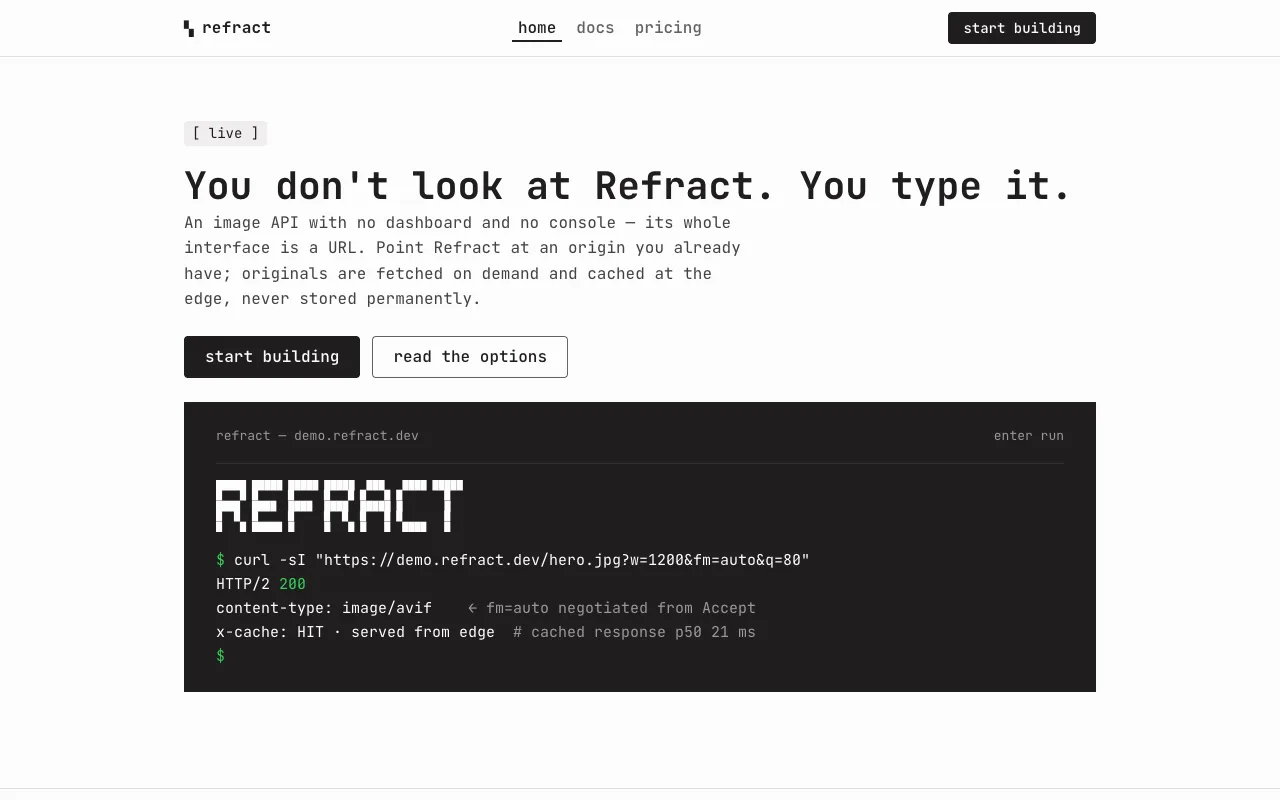
The hero terminal is a `--tui-bg` block, 0px corners, showing a genuine Refract
session: a top hint row, the block-pixel `REFRACT` wordmark once, an inset
`--tui-bg-elevated` prompt row with a green `$`, the canonical request typed with its
parameter keys in `--tui-key` blue, and — printed beneath — the response:

```
$ curl -sI "https://demo.refract.dev/hero.jpg?w=1200&fm=auto&q=80"
HTTP/2 200
content-type: image/avif        ← fm=auto negotiated from Accept
x-cache: HIT · served from edge  # cached response p50 21 ms
```

The `200` and the `$` are `--tui-ok` green; the parameter keys are `--tui-key` blue;
the trailing comments are `--on-dark-mute`. Every value printed traces to `content.md`:
`fm=auto` negotiates AVIF from the `Accept` header, the cached p50 is 21 ms. No output
dimension is asserted (the brief gives `w=1200` but no height, so none is invented), and
**no byte savings is printed here** — the 62% average is a documented figure, not this
request's measured result, and it appears only in the stats readout where it is labeled
as an average.

This is the device that recurs. opencode showed its terminal once because it had one
product to show; Refract's product is the session itself, so the SDK snippet, the `429`
example, and the playground are each their own terminal — always a real command, never
a decorative dark band.

### 2. The all-mono man page — every word in one face

The reference sets 100% of its type in one monospaced face, and that decision is its
identity. TTY inherits it without exception: display, body, buttons, table, prices,
footer — all JetBrains Mono. The docs page leans furthest into the lineage, rendering
itself as an actual `man` page with uppercase `NAME` / `SYNOPSIS` / `OPTIONS` /
`EXAMPLES` heads, so the ten parameters read as an options list and the quickstart reads
as a shell transcript. This is the layer that lets a cream marketing page read as a
developer tool with no dark IDE screenshot anywhere: the monospace *is* the screenshot.

### 3. The ASCII bracket iconography — `[+]` `[-]` `[x]`

The reference uses bracketed ASCII markers as its only iconography — bullets, toggles,
status glyphs — and renders its wordmark as block-pixel character art. TTY keeps both.
Capability rows lead with `[+]`; FAQ rows toggle `[+]` / `[-]`; a quota list uses `[+]`;
a completed quickstart step shows `[x]`. There are **no SVG icons anywhere** — not in
the nav, not on a button, not beside a feature. The `REFRACT` wordmark is a five-row
block of monospaced character cells in the nav (small) and inside the hero terminal
(larger), and it is never a vector logo.

### 4. The phosphor voltage — color confined to the terminal

The reference keeps its marketing chrome monochrome and lets its semantic colors live
only inside the TUI mockup. TTY spends its one moment of color exactly there and nowhere
else: the `$` prompt and every `200` / success line in `--tui-ok` green, every parameter
key in `--tui-key` blue, a `note:` or `negotiated` tag or `429` in `--tui-warn` amber —
all on `--tui-bg` only. Step outside a terminal and the entire page is cream, ink, and
gray. This is the single most load-bearing restraint in the palette and the easiest to
break: a green "success" toast on the pricing page, a blue link in the docs prose, an
amber badge in the nav — each would leak the terminal's voltage onto paper and flatten
the whole conceit.

### 5. The typed playground — the browser is a terminal that renders images

The brief promises a live before/after transform, and the reference has no component for
it, so TTY builds one in its own language: a working terminal whose command line is
driven by a small control row, and which **renders the transformed image inline** the
way an image-capable terminal (kitty, iTerm2) prints a picture below the command. The
source and the live result sit side by side inside the dark block as two **equal-height
framed viewports** — a fixed-height matte with the image floated inside rather than jammed
edge to edge — so the panes always align, while the result's own box scales to the output
`w:h` to keep the resize visible. A `control-row` of steppers, option groups, a slider,
and a hex field mutates the request and redraws the result in the same frame, rewriting
the printed command as it goes.

The demo is honest about its edge. **Seven parameters are browser-drawable** —
`w` `h` `fit` `crop` `rot` `blur` `bg` — and they run live via `object-fit`,
`object-position`, `transform`, `filter`, and a background color. **Three are not** —
`fm` `q` `dpr` are format negotiation, re-encoding, and pixel-ratio selection performed
at the edge from the `Accept` header, which no browser can demonstrate — so they ride
the printed request tagged `negotiated` in amber and are named without being faked. The
playground prints **no byte count and runs no file-size animation**; putting an invented
number where a developer is certain to look is the one thing this design will not do.

## Components

- **Nav bar.** `--canvas`, ~56px tall, 1px `--hairline` beneath, sticky. The block-pixel
  `REFRACT` wordmark sits flush left; three page tabs sit center — **home · docs ·
  pricing** in lowercase Body Strong, the active tab taking `aria-current="page"` and a
  2px `--ink` underline. Flush right: a single small `button-primary` "start building"
  at nav scale (4px radius, ~32px tall) — the center tabs already carry `docs`, so no
  redundant secondary button sits beside it, and the primary stays visible at every
  width. The nav never carries color.
- **`button-primary`.** `--ink` fill, `--canvas` label in Button role, **4px** radius,
  padding 4px 20px, ~36px tall at marketing scale / ~32px at nav scale. Press deepens the
  fill to `--ink-deep` with no translate and no shadow. Labels read as bracketed
  commands where it suits the voice — `[ start building ]`, `[ read the docs ]`. This is
  the only conversion mark and it is always near-black.
- **`button-secondary`.** `--canvas` fill, `--ink` label, 1px `--hairline-strong` ring,
  Button role, 4px radius. Used for "copy", "view docs", and **all three tier CTAs
  alike** — no tier gets the primary fill, because a near-black button on exactly one
  plan would claim a recommendation the content never made.
- **`button-tab` / `button-tab-active`.** Transparent fill; label `--mute` at rest,
  `--ink` active with a 2px `--hairline-strong` underline. The page tabs and the
  playground's file-picker tabs (`[1] [2]`).
- **`badge-status`.** A small monochrome chip: `--surface-card` fill, `--ink` label in
  Caption role, 4px radius, 2×8px padding, reading `[ live ]` above the hero headline.
  It stays cream-and-ink like the rest of the chrome — the dark surface is reserved for
  full command blocks, so a status chip does not borrow it and never carries color.
- **`install-snippet`.** `--surface-card` (`#F1EEEE`) fill, `--ink` mono text in Body
  role (already monospace), 4px radius, padding 12×16px, with a small "copy" affordance
  at the right edge. This is the **light** code block — it holds the canonical request
  URL on the hero and the `SYNOPSIS` line in docs, and it is distinct from the dark
  terminal: a snippet is a thing to copy, a terminal is a thing that ran.
- **`terminal`.** `--tui-bg` fill, **0px** radius, 24–32px padding, Terminal role type in
  `--on-dark` with `zero`. Top edge carries a muted hint row (`enter run   ⌘K copy`) or a
  path label in `--on-dark-mute`; body carries the command and its printed output with
  the three-color syntax palette. A `button-secondary` "copy" may sit at the top-right.
  **No syntax palette beyond the three tokens; no photograph unless it is the
  playground's inline transform result.**
- **`tui-prompt-row`.** `--tui-bg-elevated` (`#302C2C`) inset, 4px radius, padding 8×12px,
  holding the live command line: a green `$`, the request with `--tui-key` keys, and a
  blinking green caret at the end.
- **`capability-row`.** `--canvas`, Body text, 8px vertical padding, leading with a `[+]`
  marker, then a Body Strong label and a Body description on one line: `[+] transform
  ten chainable URL parameters — smart crop keeps subjects in frame`. The three
  Transform / Optimize / Deliver rows are these; the bracket is part of the text, not a
  separate icon.
- **`options-table`.** The ten-parameter reference built as a `man` OPTIONS list: an
  uppercase Caption header row on a 1px `--hairline` rule, then ten rows, 1px `--hairline`
  between, no card and no zebra. Three columns — the **parameter name in Body Strong
  `--ink`** (`w`, `fit`, `fm=auto`), the accepted values in Body `--body`, the
  description in `--body`. The `fm` / `q` / `dpr` rows carry a monochrome bracketed
  `[negotiated]` tag in their values cell — a `--surface-card` chip in `--mute`, because
  the table sits on cream and amber lives only inside a terminal; the stated default
  (`q` = 75) is printed; defaults the brief does not give are not invented.
- **`stats-readout`.** An aligned mono block of the Deliver figures, left-flush, each
  line a `Fig N.` Caption label and its value, columns aligning natively on the
  monospace: `Fig 1. cache hit ratio  98.6%` · `Fig 2. cached response p50  21 ms` ·
  `Fig 3. cold transform  p50 89 ms / p99 340 ms` · `Fig 4. edge locations  41` ·
  `Fig 5. optimize  62% avg payload reduction vs source JPEG` · `Fig 6. uptime SLA
  99.95%` (the brief's stats-band figures). A thin CSS/ASCII rule may
  sit beneath a line as a sparse decorative plot, never as a specific data curve. The
  figures are at Heading/Body scale — **there is no oversized 48px readout**; big display
  numbers are `prism` / `spec` / `cutaway`'s move, and TTY keeps its numbers in aligned
  columns the way a `ping` or `df` summary prints them.
- **`tier-column`.** `--canvas`, 0px corners, 1px `--hairline` framing, 24px padding, one
  of three side by side. In order: the tier name (Heading), the price (Heading weight,
  not oversized — `$0` / `$29` / `$249` with a `/mo` in `--mute`), a `button-secondary`
  CTA, then a quota list with `[+]` bullets in Body. No tier is flipped, colored, or
  labeled "popular"; the columns are equal and the content differentiates them.
- **`faq-row`.** A full-width disclosure, 1px `--hairline` between rows, leading with a
  `[+]` (closed) / `[-]` (open) marker: the question in Body Strong, the answer in Body
  `--body` when open. No card, no fill, no shadow — a bracket, a question, a rule.
- **`control-row`.** The playground's driver: steppers for `w` / `h`, an option group for
  `fit` / `crop` / `rot`, a slider for `blur`, and a hex field for `bg` (enabled only
  when `fit=contain`, the parameter's own scope showing). Each control is a 4px-radius
  input on `--surface-soft`, focus is the 2px `--ink` outline, and each mutates the
  result and rewrites the printed request immediately. This is the one playground in the
  system.
- **Footer.** `--canvas` — the page **never inverts at the foot**; there is no dark slab.
  1px `--hairline` top rule, a horizontal row of Caption links (`docs · pricing · status
  · changelog`) with `--hairline` cell separators, and a legal row: `© 2026 Refract` at
  left, utility cluster at right, all Caption `--mute`.

## Motion

**Calm, and mostly a single gesture.** The reference is one of the quietest systems on
the web, and TTY matches it — with one characterful exception the concept earns.

- **The hero terminal types.** On load, the hero command types itself character by
  character at the green caret, then the response prints line by line — a genuine
  terminal transcript playing out once. The caret blinks green. This is the system's one
  signature animation, and it is faithful: a terminal types. Under
  `prefers-reduced-motion: reduce`, the command and response render **fully printed at
  rest**, caret static, no typing — nothing is lost but the transcript effect.
- **The playground answers in the same frame as the control that moved.** No skeleton, no
  shimmer, no spinner, no artificial latency — the inline image redraws the way a
  viewport does, and the printed request rewrites with it.
- **No shadows to animate, no lifts.** Buttons darken on press to `--ink-deep` with no
  translate; there is no hover-lift because there is no elevation. FAQ rows toggle their
  answer with a short height ease (or instantly under reduced motion).
- **Focus is a 2px `--ink` outline** (on the terminal, a 2px `--on-dark` outline) with a
  2px offset, on every interactive element, and it is never removed — the reference's
  flat focus signal, no halo, no glow.
- **No count-up on the stats.** The `Fig N.` figures are set once, at rest. No animated
  meters, no live-ticking numbers anywhere.
- Under **`prefers-reduced-motion: reduce`**, the typing transcript, the caret blink, and
  every transition are dropped; each element renders in its final state. Turn it all off
  and the terminal still shows its command and output and the playground still redraws —
  only the easing and the type-on are gone.

## Image treatment

TTY is a terminal, not a gallery, so it is **almost imageless** — like the reference,
which has no raster images at all beyond its favicon and share card. The wordmark is
type, the icons are ASCII brackets, the stats plot is CSS, the terminals are drawn
chrome. The **only** raster photographs in the entire system are the sample inputs the
playground transforms: they are the literal files the API resizes, crops, rotates, and
blurs in front of the visitor — product I/O, not decoration — and they appear only
inside the playground terminal, rendered inline the way an image-capable terminal prints
a picture. Nowhere else on the site is there a photograph: no hero image, no capability
thumbnail, no full-bleed anything.

Two sample inputs let the playground's `[1] [2]` file-picker show a real choice of
subject, so `crop=smart` and `crop=center` have something to visibly disagree about
across two compositions.

**How every generated image in this system is prompted.** Binding rules; a still that
breaks one is regenerated, not cropped around.

1. **Nothing in frame carries language.** Every prompt states, in its own clause, that
   the image contains **no text, no lettering, no numerals, no labels, no logos, no
   brand markings, no signage, and no packaging print** anywhere in the frame. A
   generated still invents lettering if allowed, and invented lettering inside a sample
   the demo is about to enlarge is a counterfeit brand printed at size. (This is the
   image provider's most common failure; the clause is the guard.)
2. **No people, no hands.** Not one, not out of focus, not in the background. Each
   photograph is a *sample input* the API is about to resize and blur in front of a
   developer, not a lifestyle shot; a person turns the sample into an advertisement, and
   the model fuses fingers into a mass besides.
3. **The frame is quiet and survives the crop.** No props beyond the named subject, no
   busy corners. Every photograph must still read deliberately after being cropped to
   `1:1` and blurred to 100, because the playground will do exactly that, live.
4. **The subject sits off-center.** Smart crop only visibly differs from center crop when
   the subject is not already centered, so each composition pushes its subject to one
   side, giving `crop=smart` and `crop=center` a visible disagreement.

Constant tone words on every prompt: **clean, calm, modern editorial photography, soft
even daylight, generous negative space, real place or object, no people, no text.** The
register is cool and product-like — a platform's sample library, not a holiday.

Needed images (referenced `./assets/<id>.webp`):

- `demo-source-a` (4:3) — A single smooth ceramic vessel on a wide pale surface, placed
  well off-center to the right, cool soft daylight, large empty negative space to the
  left, no text, no lettering, no numerals, no labels, no logos, no brand markings, no
  signage, no packaging print, no people, no hands, quiet and uncluttered.
- `demo-source-b` (4:3) — A single ripe piece of fruit on a plain pale tabletop beside a
  soft window light, pushed off-center to the left, cool daylight, plain uncluttered
  background with generous space to the right, no text, no lettering, no numerals, no
  labels, no logos, no brand markings, no signage, no packaging print, no people, no
  hands.

## Do / Don't

Do:

- Set **every** text role in JetBrains Mono. The single-font decision is the whole
  identity; there is no sans and no serif anywhere.
- Keep `--canvas` (`#FDFCFC`) as the only body background — no gray section bands, no
  tonal alternation. Rhythm is 96px of whitespace and 1px hairlines.
- Confine all color — green, blue, amber — to inside a `--tui-bg` terminal, as syntax on
  a real command session. Keep the cream chrome monochrome, links included (ink,
  underlined, never blue).
- Make the dark surface a **literal terminal** every time it appears — a real command and
  its real output — and let it recur wherever a command runs.
- Use ASCII `[+]` / `[-]` / `[x]` markers as bullets, toggles, and status glyphs; render
  the `REFRACT` wordmark as block-pixel character art.
- Use `0px` corners on every container and `4px` on every interactive element; keep
  `letter-spacing: 0` and declare only `zero` (the slashed zero), never `tnum`.
- Make conversion the `--ink` 4px button; give all three tier CTAs the same secondary
  button; keep prices and stats in aligned columns at Heading/Body scale.
- Keep the seven browser-honest parameters wired in the playground and tag `fm` / `q` /
  `dpr` `negotiated`; print no byte count beside a live transform.
- Type the hero transcript once and blink the caret; disable both under reduced motion.

Don't:

- **No sans-serif, no serif, no italic — ever.** JetBrains Mono carries display, body,
  price, and legal line alike. A "cleaner" sans on a paragraph is the fastest way to
  break the system.
- **No color on the cream chrome.** No green success, no blue link, no amber badge
  outside a terminal. The one voltage lives on the dark surface only; a colored mark on
  paper is a defect.
- **No shadow, no lift, no float, no gradient.** The only thing that reads as elevated is
  the dark terminal, and it earns that by color. No card border-plus-shadow, no
  hover-lift, no popover elevation.
- **No 100px pill and no full-round anything.** Pills are `prism`'s language; TTY is 0px
  containers and 4px interactive elements.
- **No oversized display number.** The stats and prices stay in aligned mono columns at
  Heading/Body scale — a 48px readout is `prism` / `spec` / `cutaway`'s move.
- **No dark band as decoration.** Every dark block is a running command; a styled dark
  section behind body copy is exactly the misuse the reference forbids and this design
  repeats the terminal to avoid.
- **No invented numbers.** No byte count beside the live preview, no file-size animation,
  no latency, uptime, or edge count the brief did not supply, no "most popular" tier.
  **Every figure on this site traces to `content.md`** — the 62% average, the 21 ms /
  98.6% / 89 ms / 340 ms / 41-locations delivery stats, the 50 req/s limit and 30-day
  cache window, the prices, quotas, parameter ranges, and the default `q` of 75.
- No emoji anywhere, and **no naming of the source reference in the built page** — the
  reference is named in this document only. The site carries the product's own name,
  **Refract**, in English, and nothing else.